ROM Configuration
The N64FlashcartMenu default ROM configuration is provided from the internal database contained within the source code file rom_info.c.
Caution
The N64FlashcartMenu internal database expects that you are using a flashcart that has an UltraCIC available. A Summercart64 and ED64 X series will definitely have one.
The N64FlashcartMenu allows overriding the ROM's database through the Rom Info menu for a specific ROM, which is useful when a new game dump is found, or required by a specific game hack which uses a game ID already occupied by the internal database.
Tip
Some old ROM hacks may have adjusted the ROM code to manipulate the expected CIC and save type in order to allow compatibility with more available chips (usually 6102) as was used on flashcarts prior to 2018. If it does, you may need to override the internal database using the override settings.
Homebrew Header
The N64FlashcartMenu fully supports the homebrew header ROM's that use this do not need to be in the internal database and are automatically setup using its suggested settings.
Available Manual Overrides
Overrides will be stored in a file <rom name>.ini adjacent to the ROM.
If you override the defaults and want to go back to the default ones, delete the <rom name>.ini file.
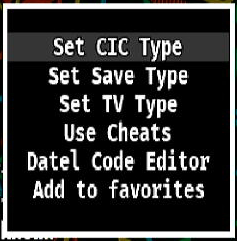
CIC type
The Checking Integrated Circuit CIC was a physical security chip used by retail Nintendo 64 game cartridges that prevented unlicensed and pirated game cartridges from running and used in conjunction with the PIF.
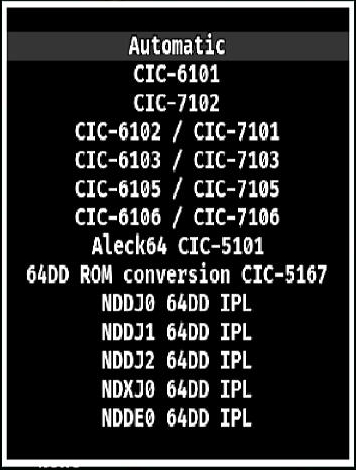
Warning
Changing the CIC type to an unsupported one may result in a blank screen for that particular ROM until you manually delete the override file!
For more detailed information regarding the various CIC chips, please visit micro-64.com's game CIC database.
Save type
Games that have been programmed to include an internal save system might use various types of chips, methods and sizes.
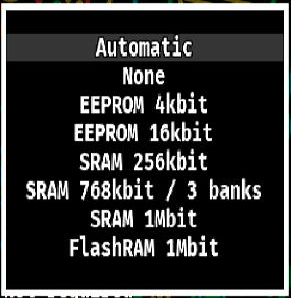
Warning
Using the wrong save type can cause unwanted behaviors on games and/or corrupt existing ones!
For more detailed information regarding the various saving methods, please visit micro-64.com's game save database
TV Region type
All ROMs are generally programmed to work with a single type of television output setting, whether it's NTSC, PAL or MPAL or their multiple variants.

Forcing the region may allow the ROM work on your display, however:
- Be aware that not every CRT from the 1990s and 2000s is compatible with both NTSC and PAL standards.
- Be aware that flat TVs from late 2010s-2020s might have other issues, such as when a game changes its internal resolution during gameplay (i.e. Resident Evil 2 with Expansion Pak).
- Expect potential side effects:
- Speed issues
- Audio/visual desynchronization
- Other unexpected/unwanted behaviors
RDRAM Clear
Certain ROM's such as RTYI demo do not correctly clear RAM on initialization. This may allow individual ROMs to boot as expected, but is not required for any commmercially released ROM.